Blog

  • GEO-optimalisatie: zo word je geciteerd door AI-zoeken (wat de data laat zien)

    GEO-optimalisatie: zo word je geciteerd door AI-zoeken (wat de data laat zien)

    Read this guide in English →

    AI-zoeken · GEO in 2026

    Wat is GEO-optimalisatie? Zorgen dat AI-zoekmachines als AI Overviews, ChatGPT en Perplexity jouw pagina citeren: eerst indexeerbaar zijn, dan het helderste onderbouwde antwoord geven. In tests verhoogden bronnen, citaten en cijfers de zichtbaarheid met tot 40%.

    Belangrijkste punten
    • Er is geen aanmeldformulier. Google zegt dat AI Overviews en AI Mode geen extra eisen stellen: de pagina moet geïndexeerd zijn en een snippet mogen tonen.
    • In het GEO-onderzoek (Princeton en IIT Delhi, KDD 2024) verhoogden bronvermeldingen, citaten en statistieken de zichtbaarheid van een pagina in AI-antwoorden met tot 40%.
    • Een top-10-positie is geen garantie meer: Ahrefs vond dat maar 37,9% van de URL’s die AI Overviews citeren ook in de eerste 10 resultaten stond (863.000 zoekresultatenpagina’s).
    • Vermeldingen van je merk op het web hangen sterker samen met zichtbaarheid in AI Overviews (0,664) dan links of Domain Rating, over 75.000 merken.
    • Elke assistent heeft een eigen zoekcrawler: OAI-SearchBot (ChatGPT), Claude-SearchBot (Claude), PerplexityBot en Bingbot (Copilot). Blokkeer je er één, dan verdwijn je uit de antwoorden van die assistent.
    • Bing Webmaster Tools is het enige gratis dashboard dat AI-citaties direct telt; Google telt AI-verkeer mee in het gewone Prestaties-rapport.
    Hoe dit is gecontroleerd. Elke regel en elk cijfer op deze pagina hebben we op 17 oktober 2026 bij de bron nagelezen: Googles documentatie over AI-functies (laatst bijgewerkt 10 december 2025), de crawlerpagina’s van OpenAI, Perplexity en Anthropic, het Bing Webmaster-blog van Microsoft, en de drie genoemde onderzoeken, gelezen op de onderzoekspagina’s zelf. Cijfers staan erbij met hun steekproefgrootte; kleine steekproeven noemen we als zodanig.
    Kort antwoord

    Je kunt een pagina niet “aanmelden” bij AI Overviews, ChatGPT of Perplexity. Ze citeren pagina’s die al indexeerbaar, betrouwbaar en makkelijk te citeren zijn.

    Dus: laat de zoekcrawlers binnen, zorg dat je in Google én Bing geïndexeerd bent, en beantwoord per sectie één vraag in de eerste twee zinnen, met een cijfer en een genoemde bron. Dat is wat de onderzoeken maten, en het is hetzelfde werk waarmee een pagina rankt.

    Wat is GEO-optimalisatie, en hoe kiest AI-zoeken welke pagina’s het citeert?

    GEO-optimalisatie (generative engine optimization) is het werk om de bron te worden die een AI-antwoord noemt; je hoort er ook AEO (answer engine optimization) of LLM-SEO voor. AI-zoektools antwoorden vanuit pagina’s die ze uit een zoekindex hebben opgehaald, en citeren de pagina’s die ze gebruikten. Google zegt het expliciet: AI Overviews en AI Mode putten uit pagina’s die geïndexeerd zijn en met een snippet in Google Zoeken getoond mogen worden. ChatGPT-zoeken, Microsoft Copilot en Perplexity werken op dezelfde manier, met hun eigen crawlers en indexen.

    Dat geeft twee filters. Eerst ophalen: kan het systeem je pagina vinden bij de vraag? Dat is gewone indexering; begin daarvoor bij je website aanmelden bij Google. Daarna selectie: welke van de opgehaalde pagina’s bevat een zin die het model met vertrouwen kan overnemen? Daar beslissen schrijfwerk en bewijs.

    WORDT GECITEERD

    Citeerbaar en onderbouwd

    Ziet eruit als: een direct antwoord onder een kop in vraagvorm, een concreet cijfer met bron, een genoemde auteur of merk, een tabel.

    WORDT OVERGESLAGEN

    Vaag en verstopt

    Ziet eruit als: een lange intro, het antwoord drie keer scrollen verderop, claims zonder bron, een pagina die niet eens geïndexeerd is.

    Wat zegt het onderzoek over GEO-optimalisatie?

    Drie bevindingen houden stand, elk uit een onderzoek dat je zelf kunt nalezen. Geen ervan is een rankingformule; samen laten ze zien waar de hefbomen zitten.

    40%maximale winst in zichtbaarheid in AI-antwoorden met GEO-methoden — Aggarwal e.a., GEO, KDD 2024
    37,9%van de URL’s die AI Overviews citeren, staat ook in Googles top 10 (863K zoekresultatenpagina’s, ±4 mln. geciteerde URL’s) — Ahrefs, maart 2026
    0,664correlatie tussen merkvermeldingen op het web en merkzichtbaarheid in AI Overviews (75.000 merken) — Ahrefs, mei 2025
    87%van de SearchGPT-citaties kwam overeen met de topresultaten van Bing, 56% met die van Google (±100 zoekvragen) — Seer Interactive, feb. 2025

    Bronnen, citaten en statistieken verhogen de zichtbaarheid

    Onderzoekers van Princeton en IIT Delhi testten in het GEO-paper negen manieren om een pagina te herschrijven op GEO-bench, een benchmark van 10.000 zoekvragen, en maten hoeveel van het gegenereerde antwoord uit die pagina kwam. De samenvatting meldt dat GEO de zichtbaarheid met tot 40% kan verhogen. In het paper zelf zijn de drie beste methoden Cite Sources (bronnen vermelden), Quotation Addition (citaten toevoegen) en Statistics Addition (statistieken toevoegen). Die gaven een relatieve verbetering van 30–40% op de woordtelmaat van het onderzoek en 15–30% op de indrukmaat. Keyword stuffing, de oude SEO-reflex, presteerde slecht.

    Een top-10-positie helpt, maar beslist niet meer

    Ahrefs analyseerde 863.000 zoekresultatenpagina’s en ongeveer 4 miljoen URL’s uit AI Overviews en vond dat 37,9% van de geciteerde URL’s ook in de eerste 10 resultaten stond. Een eerder Ahrefs-onderzoek kwam op een overlap van bijna 76%; Ahrefs zegt dat de manier van uitlezen is veranderd, dus de twee cijfers zijn niet direct vergelijkbaar. De praktische les: pagina’s voorbij pagina één worden wel geciteerd, als ze de deelvraag precies beantwoorden.

    Vermeldingen van je merk tellen zwaarder dan links

    Over 75.000 merken vond Ahrefs dat merkvermeldingen op het web de sterkste correlatie (0,664) hadden met genoemd worden in AI Overviews, vóór ankerteksten met de merknaam (0,527), zoekvolume op de merknaam (0,392) en Domain Rating (0,326). Het is een correlatie, geen bewijs van oorzaak, maar het wijst dezelfde kant op als het GEO-paper: besproken en geciteerd worden op andere sites is onderdeel van het signaal.

    ChatGPT leunt op de resultaten van Bing

    Seer Interactive vergeleek de bronnen van ChatGPT-zoeken met de resultaten van Bing en Google voor dezelfde vragen: 87% kwam overeen met de topresultaten van Bing, 56% met die van Google. De auteurs noemen het zelf een beperkte steekproef (ongeveer 100 zoekvragen, 500+ citaties, begin 2025); zie het dus als een richting, niet als een wet. Die richting is wel duidelijk: kan Bing je niet indexeren, dan mis je in een groot deel van de ChatGPT-antwoorden. Hoe je dat regelt, staat in onze uitleg van Bing Webmaster Tools.

    Welke crawler voedt welk AI-antwoord?

    Elke assistent scheidt de crawler voor zijn zoekantwoorden van de crawler die trainingsdata verzamelt. Je kunt de eerste toelaten en de tweede blokkeren; blokkeer je de zoekcrawler, dan verdwijn je uit de citaties van die assistent.

    AI-oppervlak Zoek- en citatiecrawler Trainingscrawler of -token Haalt op verzoek van de gebruiker op
    Google AI Overviews, AI Mode Googlebot (gewone zoekindex) Google-Extended (token; geen effect op Zoeken) —
    ChatGPT-zoeken OAI-SearchBot GPTBot ChatGPT-User
    Claude Claude-SearchBot ClaudeBot Claude-User
    Perplexity PerplexityBot (niet voor training) — Perplexity-User
    Microsoft Copilot, AI-samenvattingen in Bing Bingbot (Bing-index) — —

    OpenAI vat het gevolg samen in één zin: sites die OAI-SearchBot uitsluiten, worden niet getoond in de antwoorden van ChatGPT-zoeken, al kunnen ze nog wel als navigatielink verschijnen. Let op: de crawlers die op verzoek van een gebruiker ophalen (ChatGPT-User, Perplexity-User) volgen volgens hun eigen documentatie mogelijk geen robots.txt-regels. De volledige robots.txt-instelling staat in AI-crawlers en robots.txt.

    Hoe pak je GEO-optimalisatie aan, stap voor stap?

    1. Laat de zoekcrawlers binnen. Sta Googlebot, Bingbot, OAI-SearchBot, Claude-SearchBot en PerplexityBot toe in robots.txt en in je firewall. Beslis los daarvan over trainingscrawlers.
    2. Zorg dat je in Google en Bing geïndexeerd bent. Geen index, geen citaat. Los eerst gecrawld of ontdekt — niet geïndexeerd op, en meld nieuwe URL’s bij Bing met IndexNow. Hoe lang indexeren bij Google duurt, lees je in hoe lang duurt indexeren bij Google.
    3. Beantwoord de vraag in de eerste twee zinnen. Zet de vraag in de kop en het antwoord er direct onder, volledig genoeg om op zichzelf te staan als het geciteerd wordt.
    4. Geef elke belangrijke claim een cijfer en een bron. Dat is het effect van Statistics Addition en Cite Sources uit het GEO-paper. Link naar de oorspronkelijke bron, niet naar een samenvatting ervan.
    5. Citeer een genoemde expert of een document. Quotation Addition was de andere topmethode. Een kort citaat uit officiële documentatie, met bron, telt ook.
    6. Structureer voor overname. Eén onderwerp per sectie, korte alinea’s, vergelijkingstabellen en een FAQ in gewone vraagvorm. Houd de belangrijke tekst in de HTML, niet achter scripts of tabbladen waarop geklikt moet worden.
    7. Laat snippets toe. Google gebruikt nosnippet, data-nosnippet, max-snippet en noindex om te bepalen wat AI-functies mogen tonen. Een strenge max-snippet beperkt wat er geciteerd kan worden, en een noindex-tag sluit de pagina helemaal uit.
    8. Zorg dat je elders genoemd wordt. Eigen data, een gratis tool of een duidelijke mening levert de merkvermeldingen op die samenhangen met AI-zichtbaarheid. AEO en GEO draaien grotendeels hierom.
    9. Houd de pagina actueel. Zet een zichtbare bijwerkdatum op de pagina en verander die alleen als de inhoud verandert.
    Onze mening
    Jaag niet op “AI-hacks”. Elke hefboom die de onderzoeken maten — bronnen, citaten, cijfers, geïndexeerd zijn, genoemd worden — maakt een pagina ook beter voor mensen. Wie je “gegarandeerde AI-citaties” belooft, verkoopt dezelfde lucht als “gegarandeerd #1 in Google”.

    Hoe meet je of AI je citeert?

    • Bing Webmaster Tools → AI Performance. Sinds de openbare preview van februari 2026 telt het rapport citaties in Microsoft Copilot, AI-samenvattingen in Bing en een aantal partnerintegraties: totaal aantal citaties, geciteerde pagina’s, grounding-zoekvragen en trends. Op 13 oktober 2026 voegde Microsoft Topics Portfolio (bèta) toe, dat die grounding-zoekvragen groepeert in thema’s.
    • Google Search Console. Er is geen apart AI-filter: volgens Google wordt verkeer uit AI Overviews en AI Mode in het Prestaties-rapport meegeteld onder het zoektype “Web”.
    • Verwijzingsverkeer. Kijk in je analytics naar bezoeken vanaf chatgpt.com, perplexity.ai, claude.ai en copilot.microsoft.com.
    • Handmatige steekproeven. Stel je doelvragen eens per maand in elke assistent en noteer wie er geciteerd wordt. Houd de prompts gelijk, zodat de trend iets betekent.

    Wat werkt niet bij GEO-optimalisatie?

    • Een llms.txt-bestand. Google zegt dat je geen nieuwe machineleesbare bestanden, AI-tekstbestanden of markup nodig hebt om in zijn AI-functies te verschijnen. Het is hooguit optioneel onderhoud.
    • Keyword stuffing. Dat was een van de methoden die in de GEO-tests niet hielpen.
    • Speciaal “AI-schema”. Google noemt geen speciale markup voor AI Overviews. Gewone gestructureerde gegevens helpen Google de pagina te begrijpen, maar zijn geen schakelaar voor citaties.
    • Elke AI-crawler blokkeren en toch citaties verwachten. Allebei kan niet; kies per crawler.

    Veelgestelde vragen

    Hoe zorg ik dat AI mijn website citeert?

    Laat de AI-zoekcrawlers binnen, zorg dat je in Google en Bing geïndexeerd bent, en beantwoord elke vraag in de eerste twee zinnen met een concreet cijfer en een gelinkte bron. In het GEO-onderzoek verhoogden bronnen, citaten en statistieken de zichtbaarheid in AI-antwoorden met tot 40%.

    Wat is het verschil tussen GEO en SEO?

    GEO is grotendeels SEO met meer nadruk op citeerbare antwoorden, bronnen en merkvermeldingen. De basis — crawlbare, geïndexeerde, nuttige pagina’s — is dezelfde.

    Kan ik mijn site aanmelden bij ChatGPT of Perplexity?

    Nee. Ze nemen geen aanmeldingen aan. ChatGPT-zoeken gebruikt OAI-SearchBot en leunt sterk op de resultaten van Bing; Perplexity gebruikt PerplexityBot. Crawlbaar en geïndexeerd zijn is de enige ingang.

    Gebruiken AI Overviews de normale Google-index?

    Ja. Volgens Google moet een pagina geïndexeerd zijn en een snippet mogen tonen, zonder extra eisen en zonder speciale optimalisatie, om in AI Overviews of AI Mode te verschijnen.

    Moet ik in de top 10 staan om in AI Overviews geciteerd te worden?

    Nee. In het onderzoek van Ahrefs uit 2026 stond maar 37,9% van de URL’s die AI Overviews citeren ook in de top 10. Een precies antwoord op een deelvraag kan ook van verder weg geciteerd worden.

    Haalt het blokkeren van GPTBot me uit ChatGPT-zoeken?

    Nee. GPTBot is de trainingscrawler van OpenAI. ChatGPT-zoeken gebruikt OAI-SearchBot; alleen als je die blokkeert, blijf je buiten de antwoorden van ChatGPT-zoeken.

    Hoe lang duurt het voordat AI-zoeken me citeert?

    Daar staat geen vaste termijn voor. Een pagina moet eerst gecrawld en geïndexeerd worden en daarna bij de vraag opgehaald. Met IndexNow gaat die eerste stap bij Bing en Copilot sneller; Google heeft geen vergelijkbare meldfunctie, dus daar ben je afhankelijk van sitemaps en interne links.

    Hoe zie ik of Copilot of ChatGPT mijn pagina’s citeert?

    Voor Copilot en de AI-samenvattingen van Bing gebruik je het AI Performance-rapport in Bing Webmaster Tools. Voor ChatGPT, Claude en Perplexity is er geen officieel dashboard: kijk naar verwijzingsverkeer en controleer je doelvragen met de hand.

    Ook belangrijk voor AI-zoekmachines: zorg dat je afbeeldingen je naam en licentie meenemen als ze worden gedeeld. Lees afbeeldingsmetadata voor Google.


    iP
    IndexUrePoint is een onafhankelijke gids over hoe je je pagina’s gevonden en geïndexeerd krijgt — Google, Bing en AI-zoeken. We testen tools zelf en zeggen het eerlijk wanneer iets niet werkt. Fout gespot? Laat het ons weten via de contactpagina; we verbeteren het en vermelden de datum.

  • Wat is IndexNow? Direct indexeren in Bing (en waarom niet in Google)

    Wat is IndexNow? Direct indexeren in Bing (en waarom niet in Google)

    Read this guide in English →

    Bing · IndexNow · Indexeersnelheid

    IndexNow is een gratis, open protocol waarmee je site Bing, Yandex, Naver, Seznam, Yep en Amazon direct laat weten dat een URL is toegevoegd, gewijzigd of verwijderd — één melding bereikt ze allemaal, en Google is de enige grote zoekmachine die niet meedoet.

    Belangrijkste punten
    • Melden verslaat wachten: deelnemende zoekmachines weten binnen seconden van je wijziging.
    • De schaal is serieus: Microsoft meldde 1,4 miljard ingediende URL’s per dag en 17% van de nieuw aangeklikte URL’s in Bing via IndexNow.
    • Op WordPress is het één plugin; het sleutelbestand wordt voor je aangemaakt en gehost.
    • Het is een melding, geen garantie: een dunne pagina die je honderd keer pingt blijft een dunne pagina.
    • Omdat Bing’s index Copilot en veel van ChatGPT-zoeken voedt, kan sneller in Bing sneller in AI-antwoorden betekenen.
    Hoe dit is gecontroleerd. Geschreven op basis van de officiële IndexNow-documentatie (indexnow.org) en Bing Webmaster-richtlijnen, en getest op deze site: IndexUrePoint gebruikt zelf de officiële IndexNow-plugin.
    Kort antwoord

    IndexNow is een gratis, open protocol waarmee je site zoekmachines direct laat weten dat een URL is toegevoegd, gewijzigd of verwijderd — in plaats van te wachten tot ze het zelf ontdekken.

    Eén melding bereikt alle deelnemende zoekmachines: Bing, Yandex, Naver, Seznam.cz, Yep en Amazon delen de meldingen met elkaar.

    Google doet niet mee. Voor Google blijf je werken met je sitemap, interne links en Search Console.

    Hoe IndexNow werkt: melden in plaats van wachten

    Klassiek crawlen is ophalen: een zoekmachine bezoekt je site op eigen tempo en ziet wijzigingen pas later. IndexNow draait dat om: zodra je publiceert of bijwerkt, stuurt je site een klein bericht met de URL en een sleutel die bewijst dat de site van jou is.

    ZONDER INDEXNOW

    Wachten tot je gevonden wordt

    Gevolg: wijzigingen worden pas bij de volgende crawl ontdekt — uren, dagen of weken later.

    MET INDEXNOW

    Direct melden

    Gevolg: de zoekmachine weet het binnen seconden en kan de crawl voorrang geven.

    Belangrijk: IndexNow is een melding, geen garantie. Of een pagina geïndexeerd wordt, hangt nog steeds af van de kwaliteit ervan.

    Wie doet mee — en wie niet

    • Doen mee: Microsoft Bing, Yandex, Naver, Seznam.cz, Yep en Amazon (IndexNow-FAQ); in 2023 gebruikten al ruim 60 miljoen websites het protocol (Wikipedia).
    • Doet niet mee: Google. Laat je niet wijsmaken dat IndexNow je indexering in Google versnelt.
    • Waarom het in 2026 toch telt: de index van Bing voedt Bing en Microsoft Copilot en is een van de bronnen waar AI-assistenten uit putten. Sneller in Bing kan dus sneller in AI-antwoorden betekenen — zie GEO-optimalisatie.
    IndexNow Google Indexing API Sitemap
    Zoekmachines Bing, Yandex, Naver, Seznam, Yep, Amazon Alleen Google Alle
    Toegestane inhoud Elke pagina Alleen vacatures & livestreams Elke pagina
    Snelheid Seconden Snel, maar beperkt toegestaan Volgende crawl
    Risico Geen bij normaal gebruik Spamwaarschuwing bij misbruik Geen

    IndexNow instellen in 5 minuten

    • WordPress: installeer de officiële plugin IndexNow (van Microsoft Bing). Die maakt de sleutel aan, host het sleutelbestand en meldt elk nieuw, gewijzigd of verwijderd bericht automatisch.
    • Of via je SEO-plugin: Rank Math (Instant Indexing), All in One SEO en Yoast SEO Premium ondersteunen IndexNow. Kies één methode om dubbele meldingen te voorkomen.
    • Handmatig: maak een sleutel van 8–128 tekens, zet die als {sleutel}.txt in de root van je site, en meld URL’s bij api.indexnow.org/indexnow — tot 10.000 URL’s per verzoek.
    Controleer of het werkt
    In Bing Webmaster Tools zie je onder IndexNow welke URL’s zijn ontvangen en wanneer.

    Regels om je aan te houden

    • Meld alleen echte wijzigingen. Ongewijzigde URL’s steeds opnieuw melden heeft geen zin.
    • Houd het sleutelbestand bereikbaar — blokkeert een beveiligingsplugin het, dan mislukt elke melding.
    • Vervang de basis niet. IndexNow is een aanvulling op je sitemap en interne links.
    Onze mening
    IndexNow is een van de weinige SEO-maatregelen die gratis, officieel en risicoloos is. Aanzetten en vergeten. Verwar het alleen niet met Google.

    Veelgestelde vragen

    Werkt IndexNow voor Google?

    Nee. Google doet niet mee aan IndexNow. Gebruik voor Google een XML-sitemap, goede interne links en spaarzaam de functie Indexering aanvragen in Search Console.

    Is IndexNow gratis?

    Ja. Het protocol is open en gratis, net als de officiële WordPress-plugin.

    Kan IndexNow mijn site schaden?

    Niet bij normaal gebruik. Alleen nieuwe, gewijzigde of verwijderde URL’s melden is precies waarvoor het bedoeld is.

    Heb ik IndexNow nodig als ik al een sitemap heb?

    Nodig niet, nuttig wel. Een sitemap wacht tot hij gelezen wordt; IndexNow meldt wijzigingen meteen. Gebruik beide.

    Hoeveel URL’s kan ik via IndexNow indienen?

    Tot 10.000 URL’s per verzoek; de zoekmachines hanteren eigen daglimieten. Normale sites komen daar nooit bij in de buurt.

    Delen de zoekmachines mijn IndexNow-meldingen met elkaar?

    Ja. Eén melding bij een deelnemend eindpunt wordt gedeeld met alle andere deelnemers, aldus de officiële IndexNow-documentatie.

    iP
    IndexUrePoint is een onafhankelijke gids over hoe je je pagina’s gevonden en geïndexeerd krijgt — Google, Bing en AI-zoeken. We testen tools zelf en zeggen het eerlijk wanneer iets niet werkt. Fout gespot? Laat het ons weten via de contactpagina; we verbeteren het en vermelden de datum.

  • Website aanmelden bij Google (en wat te doen als je site niet geïndexeerd wordt)

    Website aanmelden bij Google (en wat te doen als je site niet geïndexeerd wordt)

    Read this guide in English →

    Google Search Console · Indexering

    Je meldt een website aan bij Google via Google Search Console: property toevoegen, eigendom verifiëren, je XML-sitemap indienen en voor je belangrijkste pagina’s indexering aanvragen — gratis, in een kwartier, en betaalde “aanmelddiensten” voegen niets toe.

    Belangrijkste punten
    • Er bestaat geen los “URL indienen”-formulier meer; Search Console is dé ingang.
    • Een domeinproperty dekt http, https, www en subdomeinen in één keer; verificatie gaat via een TXT-record in je DNS.
    • Indexering aanvragen heeft een kleine daglimiet — wij kregen na zes aanvragen “quotum overschreden” op een verse property.
    • Aanmelden versnelt het vínden; geïndexeerd worden hangt af van toegestaan → bereikbaar → de moeite waard.
    • Meld je dezelfde dag ook aan bij Bing: tien minuten extra dekt de index achter Copilot en een groot deel van ChatGPT-zoeken.
    Hoe dit is gecontroleerd. Geschreven op basis van Google’s Search Central-documentatie en de helppagina’s van Search Console. Getest op deze eigen site.
    Kort antwoord

    Je “meldt” een website bij Google aan via Google Search Console: eigendom verifiëren, je XML-sitemap indienen en belangrijke pagina’s eventueel via URL-inspectie laten ophalen. Dat is gratis en kost een kwartier.

    Maar aanmelden is geen garantie. Een pagina komt alleen in Google als hij toegestaan, bereikbaar en de moeite waard is. Staat je site na aanmelden nog niet in Google, loop dan de drie stappen hieronder af.

    Website aanmelden bij Google in 4 stappen

    • Open Google Search Console (search.google.com/search-console) en voeg je site toe. Kies bij voorkeur een domeinproperty: die dekt http, https, www en subdomeinen in één keer.
    • Verifieer je eigendom. Voor een domeinproperty voeg je een TXT-record toe bij je domeinhost (bij Hostinger onder DNS-zone). Een URL-prefix-property kan ook via een HTML-tag, bijvoorbeeld met Yoast SEO.
    • Dien je sitemap in onder Sitemaps. Met Yoast of Rank Math is dat meestal /sitemap_index.xml; zonder SEO-plugin gebruikt WordPress /wp-sitemap.xml.
    • Vraag indexering aan voor je belangrijkste pagina’s via URL-inspectie → Indexering aanvragen. Eén keer per pagina is genoeg; herhalen helpt niet.
    Vergeet Bing niet
    Meld je site ook aan bij Bing Webmaster Tools (je kunt je Search Console-gegevens importeren) en zet IndexNow aan. Bing voedt ook Microsoft Copilot en andere AI-assistenten.
    Propertytype Dekt Verificatie Beste keuze voor
    Domein Alle protocollen & subdomeinen DNS TXT-record De meeste sites (onze keuze)
    URL-voorvoegsel Alleen het exacte voorvoegsel HTML-tag/bestand, Analytics Geen DNS-toegang, of één submap

    1. Mag de pagina wel geïndexeerd worden?

    Sluit eerst de instellingen uit die Google vertellen weg te blijven. Dit zijn de snelste en meest voorkomende oplossingen:

    • Een verdwaalde noindex in de meta robots-tag of de X-Robots-Tag-header. Die blokkeert indexering volledig.
    • “Zoekmachines ontmoedigen” aangevinkt in WordPress (Instellingen → Lezen). Staat vaak nog aan na de lancering.
    • Geblokkeerd in robots.txt. Dan kan Google de pagina niet lezen.
    • Een canonical die naar een andere URL wijst. Dan indexeert Google die andere URL.

    2. Kan Google de pagina vinden en bereiken?

    • Interne links. Pagina’s waar niets naar linkt (“wezen”) worden het slechtst gevonden. Link nieuwe pagina’s vanaf sterke, al geïndexeerde pagina’s.
    • Sitemap. De URL hoort in je sitemap te staan, en die sitemap hoort ingediend te zijn.
    • Serversnelheid en fouten. Trage servers of 5xx-fouten zorgen dat Google minder crawlt.
    Zegt Search Console “Gevonden – momenteel niet geïndexeerd”?
    Dan zit je precies in deze fase: gevonden, nog niet opgehaald. Lees Gecrawld vs. Gevonden — momenteel niet geïndexeerd.

    3. Is de pagina de moeite van het bewaren waard?

    Heeft Google de pagina opgehaald en toch niet geïndexeerd, dan is dat een waardeoordeel. Wees eerlijk: is de inhoud wezenlijk uniek, beantwoordt hij een echte zoekvraag beter dan wat nu rankt, en is hij niet dun? Voeg zwakke pagina’s samen tot één sterke pagina en stuur door.

    GEVONDEN

    Gevonden, niet opgehaald

    Vindbaarheids- en prioriteitsprobleem. Oplossing: links en crawlprioriteit.

    GECRAWLD

    Opgehaald, niet bewaard

    Waardeprobleem. Oplossing: maak de pagina beter, laat Google opnieuw crawlen.

    Onze mening
    Een gloednieuwe site die na een week nog niet volledig in Google staat, is meestal gewoon normaal. Blijf nuttige pagina’s publiceren en links verdienen. Zie ook hoe lang indexeren bij Google duurt.

    Veelgestelde vragen

    Is website aanmelden bij Google gratis?

    Ja. Google Search Console is gratis, net als het indienen van een sitemap en het aanvragen van indexering. Betalen voor “aanmelding bij Google” is nooit nodig.

    Moet ik mijn website aanmelden om in Google te komen?

    Niet strikt: Google vindt sites ook via links. Maar aanmelden via Search Console versnelt het ontdekken en geeft je inzicht in fouten, dus het is altijd verstandig.

    Hoe controleer ik of mijn site in Google staat?

    Zoek op site:jouwdomein.nl voor een ruwe indruk, en gebruik het rapport Pagina-indexering en URL-inspectie in Search Console voor de exacte status per pagina.

    Helpen betaalde indexeringsdiensten?

    Zelden blijvend. Ze helpen vooral backlinks ontdekt te krijgen, niet je eigen pagina’s geaccepteerd. Heeft Google een pagina gecrawld en afgewezen, dan verandert opnieuw pingen daar niets aan.

    Wat kost het aanmelden van een website bij Google?

    Niets. Search Console, sitemaps indienen en indexering aanvragen zijn gratis. Diensten die geld vragen voor “aanmelding bij Google” verkopen een gratis proces.

    Hoe snel sta ik na aanmelding in Google?

    Het ontdekken kan binnen uren beginnen, maar indexeren duurt bij nieuwe sites doorgaans dagen tot enkele weken, afhankelijk van links en kwaliteit.

    Moet ik mijn sitemap opnieuw indienen bij elk nieuw artikel?

    Nee. Je SEO-plugin werkt de sitemap automatisch bij en Google controleert hem op eigen schema; één keer indienen is genoeg.

    Tip: geef je afbeeldingen ook maker, credit en licentie mee, zodat Google Afbeeldingen naar jou verwijst. Zie afbeeldingsmetadata voor Google.

    iP
    IndexUrePoint is een onafhankelijke gids over hoe je je pagina’s gevonden en geïndexeerd krijgt — Google, Bing en AI-zoeken. We testen tools zelf en zeggen het eerlijk wanneer iets niet werkt. Fout gespot? Laat het ons weten via de contactpagina; we verbeteren het en vermelden de datum.

  • Page With Redirect in Search Console: Normal or a Problem?

    Page With Redirect in Search Console: Normal or a Problem?

    Part of our guide: canonical tags and indexing, every Search Console status explained →

    Lees deze gids in het Nederlands →

    Google Search Console · Redirects

    “Page with redirect” means the URL forwards visitors elsewhere, so Google indexes the destination instead — usually exactly what you want. Its broken sibling, “Redirect error”, always needs fixing.

    Key takeaways
    • A long “Page with redirect” list after an https move or redesign is a sign things went right.
    • Act only when redirecting URLs sit in your sitemap, are linked internally, or point somewhere wrong.
    • “Redirect error” = loop, too-long chain, oversized URL or a broken hop — test with a live URL inspection.
    • Keep permanent moves on 301/308 and keep every redirect to a single hop: A→C, not A→B→C.
    • Google states server-side redirects do not lose PageRank — chains just waste crawl effort.
    How this was checked. Written against Google’s Page indexing report documentation and its guidance on redirects and site moves.
    Short answer

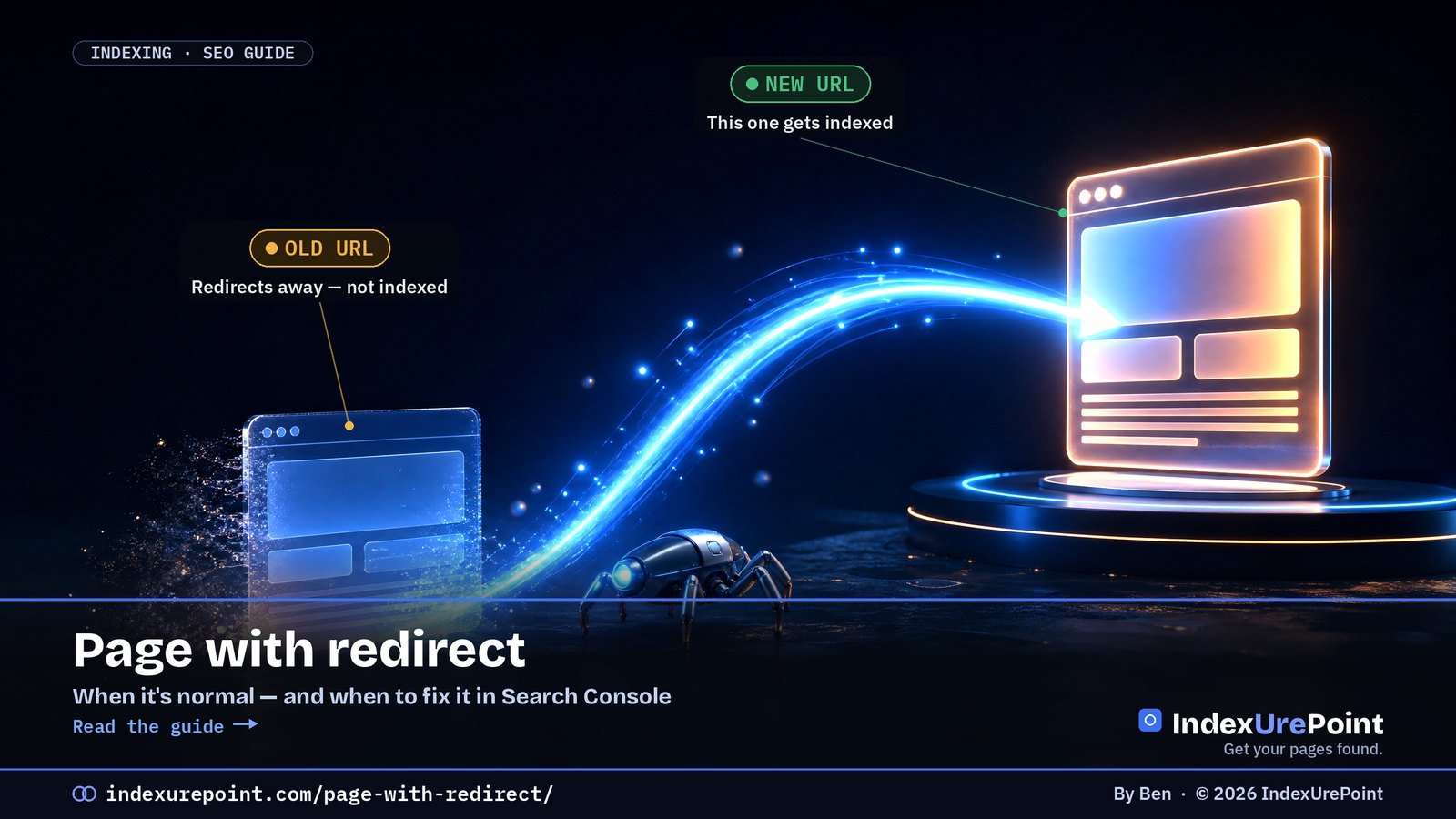
    “Page with redirect” means this URL redirects somewhere else, so Google indexes the destination, not this URL. That’s normal and usually correct.

    It only needs attention when a redirecting URL is still in your sitemap or linked internally, or when the redirect goes somewhere it shouldn’t. Its evil twin, “Redirect error” — loops, long chains, broken targets — always needs fixing.

    What “Page with redirect” means

    Google’s wording: this is a non-canonical URL that redirects to another page, so it will not be indexed. The redirect works; Google followed it and put the destination in the index instead.

    OLD URL

    Redirects away

    Status: “Page with redirect” — not indexed, on purpose.

    NEW URL

    Gets indexed

    Status: should appear as indexed and inherit the old URL’s signals.

    Normal vs. worth fixing

    • Normal: http → https, non-www → www (or the reverse), old slugs after you renamed a post, trailing-slash normalisation, deleted pages redirected to a true replacement.
    • Worth fixing: redirecting URLs listed in your XML sitemap — a sitemap should only list final, indexable URLs.
    • Worth fixing: internal links and menus pointing to URLs that redirect. Every hop wastes crawl effort; link to the final URL directly.
    • Worth fixing: a page you want indexed that redirects unexpectedly — often a plugin rule, a language redirect or a login redirect.
    Situation Status you’ll see Action
    http → https, www normalisation, renamed slugs Page with redirect None — working as designed
    Redirecting URL still in sitemap or menus Page with redirect Point sitemap/links at the final URL
    Loop or chain that never resolves Redirect error Fix at one layer; flatten to one hop
    Deleted pages mass-redirected to homepage Soft 404 Redirect to real equivalents or serve 404/410

    “Redirect error” — the one you must fix

    This separate status means Google couldn’t complete the redirect at all. Google lists the causes: a redirect chain that was too long, a redirect loop, a redirect URL that exceeded the maximum URL length, or a bad or empty URL in the chain. Test the URL with URL Inspection’s live test or any redirect-checker, and make each old URL go directly to its final destination in one 301 hop.

    Watch for loops
    Loops often come from two systems fighting: e.g. a CDN forcing https while the server forces http, or a redirect plugin and .htaccess rule pointing at each other. Fix it at one layer only.

    Clean-up checklist

    • Sitemap: make sure it lists only final URLs (Yoast and Rank Math handle this automatically for normal posts).
    • Internal links: update menus and in-content links to the final URL.
    • Use 301 for permanent moves and keep redirects in place for at least a year after a migration.
    • Flatten chains: A → B → C becomes A → C and B → C.
    • Don’t redirect everything to the homepage — Google tends to treat that as a soft 404.
    Our take
    A long list under “Page with redirect” after a redesign or https move is a sign things went right. Spend your energy on the sitemap and internal links — and on any “Redirect error” entries, which are real breakages.

    FAQ

    Should I fix “Page with redirect” in Search Console?

    Usually no. Only act if the redirecting URL is in your sitemap, linked internally, or is a page you actually wanted indexed.

    Should I click Validate fix for “Page with redirect”?

    There’s nothing to validate if the redirects are intentional. The URLs will remain in the report as long as Google knows about them, and that’s fine.

    Do redirects lose ranking power?

    Google has said 301 and other server-side redirects don’t cause a loss of PageRank. Chains still slow crawling, so keep redirects to one hop.

    301 or 302?

    Use 301 (or 308) for permanent moves. 302/307 signal a temporary move; Google may keep the old URL indexed longer.

    How long should I keep redirects after a migration?

    Google advises keeping 301 redirects in place for at least a year; longer costs nothing and preserves signals from old links.

    Do redirects slow my site down?

    Each hop adds a round trip for users and crawlers. One hop is fine; chains of three or more are worth flattening.

    iP
    IndexUrePoint is an independent guide to getting your pages found and indexed — Google, Bing, and AI search. We test tools ourselves and say plainly when something doesn’t work. Spotted an error? Tell us via the contact page; we’ll fix it and note the date.

  • Sitemap Could Not Be Read / Couldn’t Fetch: How to Fix It

    Sitemap Could Not Be Read / Couldn’t Fetch: How to Fix It

    Lees deze gids in het Nederlands →

    Google Search Console · Sitemaps

    “Sitemap could not be read” (or “Couldn’t fetch”) means Google tried to load your sitemap and failed — wrong URL, a block, broken XML, or simply a brand-new submission that has not been processed yet.

    Key takeaways
    • First check: open the sitemap URL yourself in a private window. Loads fine → usually wait; fails → fix URL, block or XML.
    • The classic mistake is submitting /sitemap.xml out of habit while your plugin serves /sitemap_index.xml.
    • On brand-new sites “Couldn’t fetch” often flips to “Success” by itself within days — ours did within minutes.
    • Limits: 50,000 URLs or 50 MB uncompressed per sitemap; beyond that, split and use a sitemap index.
    • A sitemap is a discovery aid, not an indexing switch: well-linked pages get found even while it misbehaves.
    How this was checked. Written against Google’s sitemap documentation and the Sitemaps report help.
    Short answer

    “Sitemap could not be read” or “Couldn’t fetch” means Google tried to load your sitemap and failed — it got an error, was blocked, or couldn’t parse the file.

    First open the sitemap URL in your browser. If it loads as clean XML, the cause is usually Google’s side or a new submission still pending — give it a few days. If it doesn’t load, fix the URL, the blocking rule or the XML error below.

    The 2-minute first check

    Paste your exact sitemap URL into a browser (logged out / private window).
    It loads as a list of URLs
    1. Is it the exact URL you submitted?
    2. Test it with URL Inspection → Test live URL.
    3. New submission? Wait a few days, then resubmit once.
    It errors, redirects or shows HTML
    1. 404? You submitted the wrong URL.
    2. Login, firewall or challenge page? Googlebot is blocked.
    3. Garbled or blank? The XML is broken.

    Symptom in the browser Likely cause Fix
    404 Wrong sitemap URL submitted Submit the URL your plugin generates
    Login/challenge page Firewall or bot protection blocks Googlebot Whitelist verified search bots
    Blank or garbled output Broken XML, output before <?xml, cache plugin Validate XML; exclude sitemap from caching
    Loads perfectly New submission or Google-side delay Wait a few days, resubmit once

    The real causes

    • Wrong URL. WordPress with Yoast uses /sitemap_index.xml; WordPress core uses /wp-sitemap.xml; Rank Math uses /sitemap_index.xml. Submitting /sitemap.xml by habit is the classic mistake.
    • Blocked for Googlebot. A robots.txt rule, a security plugin, a firewall or bot-protection challenge that lets you in but not Google.
    • Broken XML. Blank lines or PHP warnings before the <?xml declaration, unescaped ampersands, or a caching plugin serving a minified HTML version.
    • Too big. A single sitemap may hold at most 50,000 URLs or 50 MB uncompressed. Split larger ones and use a sitemap index.
    • Server errors or timeouts while Google fetched it — slow hosting, rate limiting, 5xx responses.
    • A brand-new submission. On new sites the report often shows “Couldn’t fetch” for a while even when the file is fine. Many site owners see it flip to “Success” on its own.

    Fixes that work

    • Submit the exact URL your plugin generates, and delete stale submissions of old sitemap URLs.
    • Exclude sitemaps from caching and minification, and whitelist Googlebot in your security or firewall settings.
    • Validate the XML with any online XML sitemap validator; fix anything before the opening <?xml line.
    • List the sitemap in robots.txt with a Sitemap: line, so every crawler — including Bing — finds it.
    • Resubmit once after fixing. Repeated resubmits don’t speed anything up.
    Keep perspective
    A sitemap is a discovery aid, not an indexing switch. Pages that are well linked internally get found even while the sitemap is misbehaving. If pages are found but still not indexed, the problem lies elsewhere — start with Crawled vs. Discovered.
    Our take
    Before you panic about “Couldn’t fetch,” open the URL yourself. If it loads cleanly for a logged-out visitor, you’re mostly waiting on Google. If it doesn’t, the fix is almost always one of the five causes above.

    FAQ

    Why does Search Console say “Couldn’t fetch” when my sitemap works?

    On new submissions this status often appears temporarily. If the file loads for logged-out visitors and passes a live test, wait a few days. If it persists, check firewall or bot-protection rules that might treat Googlebot differently.

    Does a sitemap error stop my site from being indexed?

    No. Google also discovers pages through links. A working sitemap helps discovery, especially on new or large sites, but it isn’t required for indexing.

    How many URLs can one sitemap contain?

    Up to 50,000 URLs or 50 MB uncompressed. For more, split into several sitemaps and submit a sitemap index file.

    Should I submit my sitemap to Bing too?

    Yes. Submit it in Bing Webmaster Tools and add the Sitemap line to robots.txt. For instant updates on Bing, also use IndexNow.

    Should sitemaps be in robots.txt?

    Yes. Add a Sitemap: line with the full URL. Every major crawler, including Bing, reads it from there even without a manual submission.

    Can I submit more than one sitemap?

    Yes. You can submit several sitemaps or one sitemap index that references them all; Search Console lists each with its own status.

    iP
    IndexUrePoint is an independent guide to getting your pages found and indexed — Google, Bing, and AI search. We test tools ourselves and say plainly when something doesn’t work. Spotted an error? Tell us via the contact page; we’ll fix it and note the date.

  • Excluded by ‘noindex’ Tag: Find It, Remove It, Get Indexed

    Excluded by ‘noindex’ Tag: Find It, Remove It, Get Indexed

    Lees deze gids in het Nederlands →

    Google Search Console · noindex

    “Excluded by noindex tag” means Google crawled your page, found an instruction not to index it, and obeyed — the only question is whether you put that instruction there on purpose.

    Key takeaways
    • Intentional noindex (thank-you pages, archives, logins) needs no action; accidental noindex on money pages is an emergency with a one-setting fix.
    • A noindex hides in four places: the robots meta tag, the X-Robots-Tag header, WordPress’s “Discourage search engines” box, and per-post SEO-plugin settings.
    • Fix the source, not the page: a post type set to noindex re-applies it to every new post.
    • The page must stay crawlable — block it in robots.txt and Google can never see that you removed the noindex.
    • After the fix: purge caches, then request indexing for important pages.
    How this was checked. Written against Google’s documentation on the noindex directive and the Page indexing report, and tested against how Yoast SEO, Rank Math and WordPress core output robots meta tags.
    Short answer

    “Excluded by ‘noindex’ tag” means Google crawled the page, found an instruction not to index it, and obeyed.

    If that’s intentional (thank-you pages, tag archives, private pages) — nothing to do. If it’s a page you want in Google, find where the noindex comes from — your SEO plugin, a WordPress setting, or an HTTP header — remove it, then request indexing.

    What “Excluded by ‘noindex’ tag” means

    Google’s wording: when it tried to index the page, it encountered a noindex directive and therefore did not index it. It’s the most obedient status in the report — Google did exactly what the page told it to.

    INTENTIONAL

    Leave it

    Examples: login, cart, thank-you pages, internal search, thin archives, staging copies.

    ACCIDENTAL

    Fix it now

    Examples: blog posts, product pages, your homepage — anything that should earn traffic.

    Where a noindex hides

    • The robots meta tag in the page’s HTML: <meta name=”robots” content=”noindex”>. View source and search for “noindex”.
    • The X-Robots-Tag HTTP header, set by the server, CDN or a plugin. It’s invisible in the page source — check the response headers, or URL Inspection’s “Indexing allowed?” line.
    • WordPress “Discourage search engines” (Settings → Reading). One checkbox that noindexes the entire site. Often left on after launch.
    • SEO plugin settings. Yoast: “Allow search engines to show this content in search results?” per post and per content type. Rank Math: the Robots Meta setting per post and in Titles & Meta.
    • Maintenance or “coming soon” plugins and some page builders that add noindex while active.
    Where the noindex hides How to check How to fix
    Robots meta tag in HTML View source, search “noindex” SEO plugin per-post setting
    X-Robots-Tag HTTP header URL Inspection → “Indexing allowed?” Server/CDN/plugin config
    WordPress Reading settings Settings → Reading checkbox Untick “Discourage search engines”
    Content-type defaults (Yoast/Rank Math) Plugin → Search appearance Set type to indexable

    Remove it step by step

    • Confirm in URL Inspection. Run a live test: “Indexing allowed? No: ‘noindex’ detected in ‘robots’ meta tag” (or in the X-Robots-Tag header) tells you which source to chase.
    • Fix the source, not just the page: if a whole post type is set to noindex in your SEO plugin, every new post inherits it.
    • Purge caches. Page caches and CDNs can keep serving the old noindexed HTML. Clear them after the change.
    • Make sure it isn’t blocked by robots.txt. Google must crawl the page to see the change — see Blocked by robots.txt.
    • Request indexing for important pages and click Validate fix for the rest.
    Our take
    A stray noindex is the cheapest indexing problem there is — one setting, instantly fixable. That’s why it’s step one in our “why isn’t Google indexing my site” checklist. Check it before you touch anything else.

    No noindex in the HTML? Check the response headers: a noindex can also come from an X-Robots-Tag HTTP header, which never shows up in the page source.

    FAQ

    How long after removing noindex will Google index the page?

    Google has to recrawl the page first. With Request indexing that’s often days; for less important pages it can take weeks. See how long Google takes to index.

    Is noindex the same as blocking in robots.txt?

    No. noindex says “don’t show this in search” and needs the page to be crawled. robots.txt says “don’t crawl this” and doesn’t reliably keep the URL out of the index.

    Should I noindex tag and category pages?

    Only if they’re thin or duplicate. Useful category pages with unique introductions can rank well. Noindex the empty or near-duplicate ones.

    Does noindex affect Bing too?

    Yes. Bing and other major engines respect the robots meta tag and the X-Robots-Tag header in the same way.

    Is noindex a penalty?

    No. It is an instruction your own site sends. Google simply obeys it; remove it and the page becomes eligible for indexing again.

    Should I combine noindex with nofollow?

    Usually noindex alone is right: links on the page keep passing signals. Long-noindexed pages may eventually be crawled less, so do not park important pages on noindex.

    iP
    IndexUrePoint is an independent guide to getting your pages found and indexed — Google, Bing, and AI search. We test tools ourselves and say plainly when something doesn’t work. Spotted an error? Tell us via the contact page; we’ll fix it and note the date.

  • Blocked by robots.txt (and “Indexed, Though Blocked”): What to Do

    Blocked by robots.txt (and “Indexed, Though Blocked”): What to Do

    Lees deze gids in het Nederlands →

    Google Search Console · robots.txt

    “Blocked by robots.txt” means your robots.txt forbids Googlebot from crawling the URL — and because robots.txt controls crawling, not indexing, the blocked page can still end up in Google as a bare, description-less result.

    Key takeaways
    • robots.txt stops crawling; noindex stops indexing. Mixing them up is the most common robots mistake.
    • “Indexed, though blocked by robots.txt” happens when links point at a URL Google may not read.
    • To remove a page from Google you must allow crawling so Google can see the noindex.
    • Common accidental blocks: a leftover Disallow: / from staging, or a prefix rule that matches more than intended.
    • Rules match by prefix: Disallow: /blog also blocks /blog-tips/.
    How this was checked. Written against Google’s robots.txt documentation, the Page indexing report help, and the robots.txt report in Search Console.
    Short answer

    “Blocked by robots.txt” means your robots.txt file tells Googlebot not to crawl this URL, so Google can’t read it — and won’t index its content.

    “Indexed, though blocked by robots.txt” is the odd twin: Google indexed the URL anyway, usually because other pages link to it, but without being able to read it.

    The key rule: robots.txt controls crawling, not indexing. To keep a page out of Google, use noindex — and let Google crawl the page so it can see it.

    “Blocked by robots.txt” — what it means

    Your robots.txt (at yoursite.com/robots.txt) contains a Disallow rule that matches this URL. Googlebot obeys it and doesn’t fetch the page. For admin areas, cart pages and internal search results, that’s exactly what you want. For articles and product pages, it’s a mistake.

    Common accidental blocks: a leftover Disallow: / from a staging site, a too-broad rule like Disallow: /p that also matches /products/, or a plugin that rewrote the file.

    “Indexed, though blocked by robots.txt” — what it means

    Google can index a URL it isn’t allowed to crawl if enough links point to it. It then shows the URL with little or no description, because it never read the page. This is a warning, and it trips people up in both directions:

    YOU WANT IT INDEXED

    Unblock it

    Fix: remove the Disallow rule so Google can crawl and properly index the content.

    YOU WANT IT GONE

    Unblock + noindex

    Fix: allow crawling and add noindex. Blocked pages can’t show Google their noindex.

    Goal robots.txt noindex Right choice
    Keep a page out of Google results Unreliable Yes Allow crawling + noindex
    Save crawl budget on filters/search pages Yes No effect on crawl robots.txt Disallow
    Remove an already-indexed page Makes it worse Yes Unblock + noindex, or 404/410
    Keep AI training crawlers out Yes (per user agent) No robots.txt, see AI crawlers guide

    What do you actually want?

    • Page should rank → it must be crawlable. Remove the matching Disallow rule.
    • Page should never appear in search → allow crawling, add a noindex meta tag or X-Robots-Tag header. Once Google has dropped it, you can leave it as is.
    • Page is crawl waste (filters, internal search, endless calendars) and isn’t indexed → a robots.txt block is fine. Ignore the report for those URLs.

    How to fix both statuses

    • Open the robots.txt report in Search Console (Settings → robots.txt). It shows the version Google fetched, when, and any parse errors.
    • Find the matching rule. URL Inspection tells you a URL is blocked; compare its path with your Disallow lines. Remember that rules match by prefix.
    • Edit carefully. On WordPress, Yoast (Tools → File editor) and Rank Math let you edit robots.txt; otherwise edit the file in your site root. Never block CSS or JavaScript your pages need to render.
    • Keep the sitemap line. Add Sitemap: https://yoursite.com/sitemap_index.xml (or your sitemap’s URL) so crawlers find it.
    • Validate. Click Validate fix on the issue, or Request indexing for the key pages.
    Our take
    The number-one robots.txt mistake is using it to “hide” pages. It hides nothing — it just blinds Google. Use robots.txt to save crawl effort, and noindex to control what’s shown in search.

    Need to keep a PDF or image out of Google? Don’t block it in robots.txt — send a noindex with the X-Robots-Tag header instead.

    Not robots.txt, but a 403? If Search Console shows “Blocked due to access forbidden (403)”, the block is in your firewall or server, not in robots.txt: here’s how to fix it.

    Test your rules. Paste your robots.txt into our free robots.txt tester to see exactly which rule blocks a URL for Googlebot.

    FAQ

    Does robots.txt remove a page from Google?

    No. robots.txt only stops crawling. A blocked URL can still be indexed from links. To remove a page, allow crawling and use noindex, or delete it and return 404/410.

    Should I block AI crawlers in robots.txt?

    You can, with rules for their specific user agents, but it’s a trade-off: blocking an assistant’s crawler can keep your content out of its answers. Decide per crawler, deliberately.

    How fast does Google see robots.txt changes?

    Google generally caches robots.txt for up to about a day. The robots.txt report in Search Console shows when it was last fetched.

    Where did the robots.txt Tester go?

    Google retired the old robots.txt Tester and replaced it with the robots.txt report under Settings in Search Console. URL Inspection also shows whether a specific URL is blocked.

    Where do I find my robots.txt file?

    It always lives at the root: yoursite.com/robots.txt. In WordPress, Yoast and Rank Math include an editor for it; otherwise edit the file on your server.

    Can robots.txt hide a page from people?

    No. Anyone can open the URL directly, and the robots.txt file itself is public. Use a login or password protection for genuinely private content.

    iP
    IndexUrePoint is an independent guide to getting your pages found and indexed — Google, Bing, and AI search. We test tools ourselves and say plainly when something doesn’t work. Spotted an error? Tell us via the contact page; we’ll fix it and note the date.

  • Soft 404 Errors: What They Are and How to Fix Them

    Soft 404 Errors: What They Are and How to Fix Them

    Lees deze gids in het Nederlands →

    Google Search Console · Page indexing

    A soft 404 is a page that returns “200 OK” to browsers but looks missing or empty to Google — so Google treats it as not found and keeps it out of the index.

    Key takeaways
    • The status code says “page exists”, the content says “nothing here” — Google believes the content.
    • Six usual causes: fake 404 pages returning 200, empty category/search pages, gutted product pages, irrelevant redirects, placeholders and failed JavaScript rendering.
    • Mass-redirecting deleted URLs to the homepage is itself treated as a soft 404 by Google.
    • The fix depends on the page: gone → real 404/410; moved → 301 to an equivalent; real page → give it real content.
    • For JavaScript sites, test the live URL in Search Console: a blank rendered screenshot means Google sees an empty page.
    How this was checked. Written against Google’s documentation on soft 404 errors and the Page indexing report.
    Short answer

    A soft 404 is a page that tells browsers “everything’s fine” (HTTP 200) but looks to Google like a missing or empty page. Google treats it as not found and won’t index it.

    The fix depends on what the page really is: gone? return a real 404 or 410. Moved? 301 to the closest equivalent. Real page? give it enough real content that it no longer looks empty.

    What a soft 404 is

    Google’s definition: the page returns a user-friendly “not found” message, but not a 404 HTTP response code. In practice Google also flags pages that are technically “found” but have so little content they might as well be missing.

    SERVER SAYS

    200 OK — page exists

    The signal: “Index me, I’m a normal page.”

    GOOGLE SEES

    Empty or “not found”

    The verdict: the status code is lying, so Google treats it as a 404.

    What the page really is Right response Wrong response
    Gone for good 404 or 410 + remove from sitemap Redirect to homepage
    Replaced by another page 301 to the closest equivalent 301 to an unrelated page
    Temporarily out of stock Keep live with full info + alternatives Strip to a “not available” line
    Real page Google sees as empty Fix rendering / add real content Request indexing repeatedly

    The six usual causes

    • Custom “not found” pages that return 200. The page says “Oops, nothing here” but the server reports success.
    • Empty category, tag or search pages. “No products found” or “No posts yet” with nothing else on the page.
    • Out-of-stock or expired items reduced to a title and a “no longer available” line.
    • Redirects to an irrelevant page — especially mass-redirecting deleted URLs to the homepage. Google often treats those as soft 404s.
    • Thin placeholder pages — “coming soon,” near-empty templates, auto-generated location pages.
    • Rendering failures. JavaScript that fails for Googlebot, or resources blocked by robots.txt, so Google renders a blank page.

    Fix it by page type

    Ask one question: should this URL exist?
    No — it’s gone or useless
    1. Gone for good? Return 404 or 410.
    2. Replaced? 301 to the closest relevant page — not the homepage.
    3. Remove it from your sitemap and internal links.
    Yes — it’s a real page
    1. Does it render fully in URL Inspection’s live test?
    2. Does it have real, unique content above the fold?
    3. Empty archive? Add content or noindex it until it fills.

    • Shops: keep temporarily out-of-stock products live with full details, alternatives and a restock note. For permanently discontinued items, 301 to the successor or category — or return 404/410.
    • JavaScript sites: use URL Inspection → Test live URL → View tested page. If the screenshot is blank, fix rendering (server-side rendering, unblocked resources) before anything else.
    • WordPress: make sure your theme’s 404 template really returns a 404 status, and noindex empty tag archives with your SEO plugin.
    Our take
    Soft 404s on pages that should be gone are fine — Google reached the right conclusion. The ones to fix are real pages Google mistook for empty. That’s almost always a content or rendering problem, not a status-code trick.

    FAQ

    Is a soft 404 bad for SEO?

    For pages that should be gone, it’s harmless but wasteful — a proper 404 or 410 is cleaner. For real pages, it’s bad: Google won’t index them until they stop looking empty.

    Should I redirect all 404s to the homepage?

    No. Google usually treats irrelevant redirects to the homepage as soft 404s. Redirect only to a genuinely equivalent page; otherwise let the URL return 404 or 410.

    What’s the difference between 404 and 410?

    Both say the page isn’t there. 410 means “gone on purpose, permanently,” which some sites use to signal removal more clearly. In practice Google handles both as not found.

    How do I get Google to recheck after fixing?

    Fix the pages, then click Validate fix on the Soft 404 issue in Search Console. Google recrawls the affected URLs; validation typically takes up to about two weeks.

    Why does Google report a soft 404 on a page that exists?

    Because the rendered page looks empty or like an error to Google: little content above the fold, a “nothing found” message, or JavaScript that fails for Googlebot.

    Do soft 404s waste crawl budget?

    They can. Googlebot keeps rechecking URLs that claim to exist. Returning a proper 404 or 410 tells it to stop, which frees attention for pages that matter.

    iP
    IndexUrePoint is an independent guide to getting your pages found and indexed — Google, Bing, and AI search. We test tools ourselves and say plainly when something doesn’t work. Spotted an error? Tell us via the contact page; we’ll fix it and note the date.

  • Alternate Page With Proper Canonical Tag: Why It’s Usually Fine

    Alternate Page With Proper Canonical Tag: Why It’s Usually Fine

    Part of our guide: canonical tags and indexing, every Search Console status explained →

    Google Search Console · Canonicalization

    “Alternate page with proper canonical tag” means this URL points to another page as the main version and Google agreed — in most cases that is your canonical setup working exactly as intended.

    Key takeaways
    • This status is usually good news: the canonical page is indexed and collects the ranking signals.
    • Normal residents of this list: parameter URLs, AMP/mobile variants, product variants and syndicated copies.
    • It becomes a problem only when a unique page you want to rank appears here — then its canonical points to the wrong place.
    • A growing count usually just means Google is discovering more variants and handling them correctly.
    • Language versions belong in hreflang, not in canonicals: each language is its own canonical page.
    How this was checked. Written against Google’s Page indexing report documentation and its canonicalization guidelines.
    Short answer

    “Alternate page with proper canonical tag” is usually good news. It means this URL points to another page as the canonical, Google agreed, and the canonical page is indexed.

    In other words: your setup is working. The alternate URL isn’t indexed on purpose, and its content is represented by the canonical.

    Only act if a page listed here is a unique page you want to rank — then its canonical tag is pointing to the wrong place.

    What “Alternate page with proper canonical tag” means

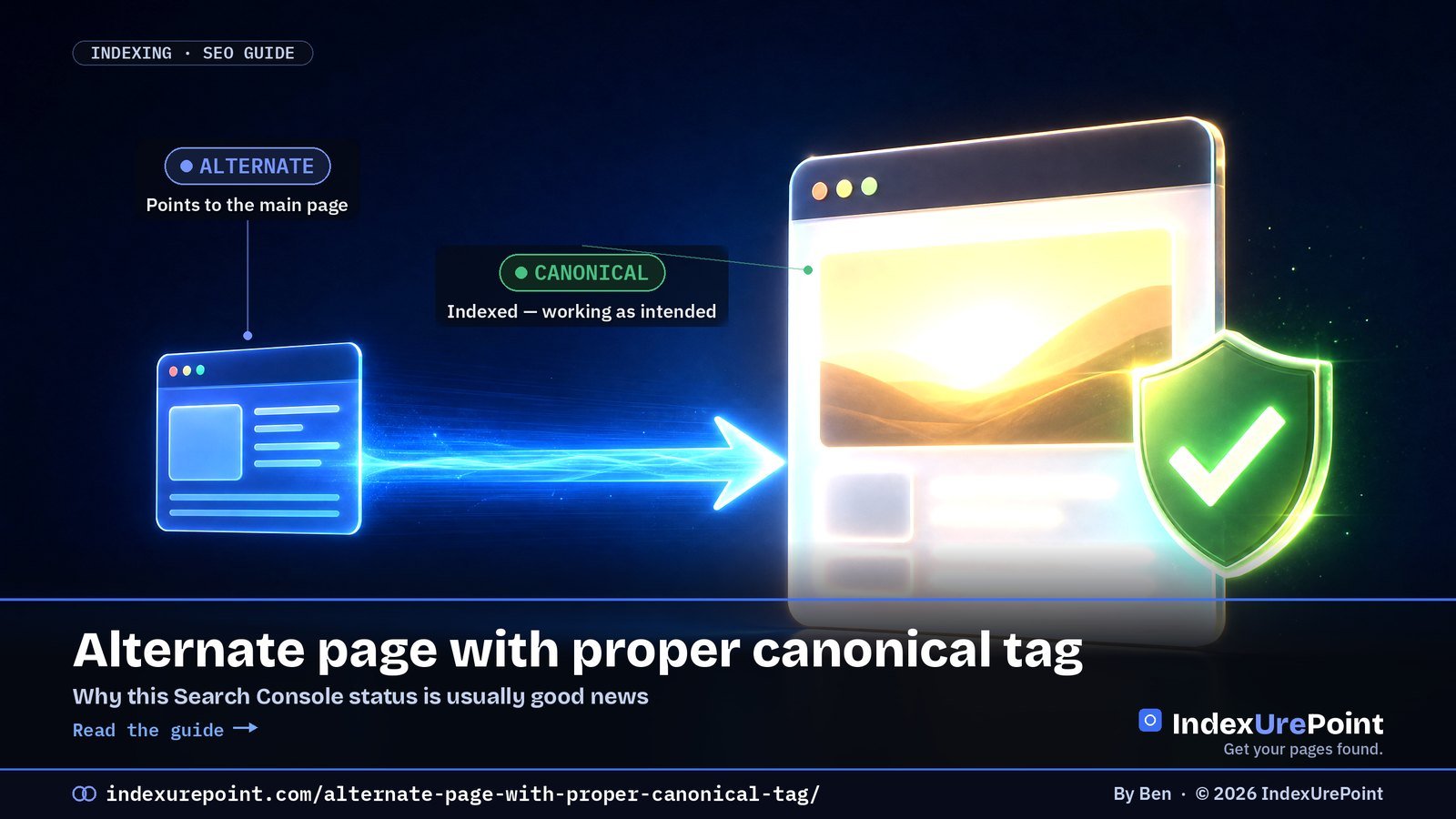
    Google’s description: the page is marked as an alternate of another page and correctly points to the canonical page, which is indexed. You said “the main version lives over there,” and Google said “agreed.”

    THIS URL

    The alternate

    Status: not indexed by design. Its rel=”canonical” points elsewhere.

    THE CANONICAL

    The main version

    Status: indexed. It collects the ranking signals for both URLs.

    When it’s completely normal (most of the time)

    • Tracking and sort parameters — ?utm_source=, ?sort=price — pointing to the clean URL.
    • Separate mobile or AMP versions that point to the main page.
    • Product variants (colour, size) that canonicalize to one main product page.
    • Syndicated or republished copies that credit the original.

    In all these cases, a growing number in this report simply means Google is discovering more variants and handling them correctly. You don’t need to “fix” anything, and you don’t need to click Validate fix.

    What’s listed Is it a problem? What to do
    Tracking/sort parameter URLs No Nothing
    AMP or mobile variants No Nothing
    Product variants pointing to the main product No Nothing
    Unique articles or products you want ranked Yes Make their canonical self-referencing
    Language versions canonicalized to one language Yes Self-canonical + hreflang

    When it’s a real problem

    It’s a problem only when a URL in this list should be indexed in its own right. Typical culprits:

    • A theme or plugin bug that sets every page’s canonical to the homepage or to page 1 of a blog.
    • Copied templates where a hard-coded canonical from one page ended up on others.
    • Paginated pages (page 2, 3…) canonicalized to page 1, which hides the posts linked only from deeper pages.
    • Language versions canonicalized to one language instead of each pointing to itself and using hreflang.
    Quick test
    Scan the example URLs in the report. If they’re all parameter or variant URLs, relax. If you see real articles, product pages or language versions, open one in URL Inspection and check the “User-declared canonical.”

    How to fix a wrong canonical

    • Make unique pages self-referencing. Each page you want indexed should point its canonical at itself.
    • Find the source. Check your SEO plugin’s per-page canonical field, your theme header, and any “canonical URL” setting that was filled in by mistake.
    • Handle languages with hreflang, not canonicals. Each language version is its own canonical; hreflang links them together.
    • Then validate. After fixing, use Validate fix or URL Inspection → Request indexing for the key pages, and give Google time to recrawl.
    Our take
    This is the one “not indexed” status we’d call a health signal. If you want to worry about canonicals, look at Duplicate without user-selected canonical and Google chose different canonical than user instead.

    FAQ

    Should I fix “Alternate page with proper canonical tag”?

    Usually not. It confirms your canonical tags work. Only fix it when a unique page you want indexed appears in the list.

    Does this status hurt my SEO?

    No. The canonical page is indexed and receives the signals. It’s the intended outcome of a correct canonical setup.

    Why is the number going up?

    Google is finding more variant URLs — new parameters, filters or tracking links — and correctly folding them into their canonicals. That’s normal as a site grows.

    Should I remove these URLs with the Removals tool?

    No. The Removals tool only hides URLs temporarily and isn’t meant for canonical variants. Leave them; Google is already treating them correctly.

    What is a canonical tag?

    A rel=”canonical” link in the page head that names the main version of a page. Search engines use it as a strong hint when choosing which of several similar URLs to index.

    How do I check what a page declares as canonical?

    View the page source and search for rel=”canonical”, or inspect the URL in Search Console, which shows the user-declared and the Google-selected canonical side by side.

    iP
    IndexUrePoint is an independent guide to getting your pages found and indexed — Google, Bing, and AI search. We test tools ourselves and say plainly when something doesn’t work. Spotted an error? Tell us via the contact page; we’ll fix it and note the date.

  • Duplicate Without User-Selected Canonical: What It Means and How to Fix It

    Duplicate Without User-Selected Canonical: What It Means and How to Fix It

    Part of our guide: canonical tags and indexing, every Search Console status explained →

    Google Search Console · Canonicalization

    “Duplicate without user-selected canonical” means Google found near-identical pages on your site, you never said which one is the main version, so Google picked one itself — and this URL lost.

    Key takeaways
    • This is an informational status, not an error: Google indexed the version it judged canonical.
    • The number-one cause is URL variants: parameters, http/https, www/non-www and trailing slashes.
    • The fix is alignment: a self-referencing canonical tag plus sitemap, internal links and redirects that all name the same URL.
    • Google treats rel="canonical" as a hint, not a command — conflicting signals get overridden.
    • Only act when a URL you actually want to rank is the one being set aside.
    How this was checked. Written against Google’s Page indexing report documentation and its guide to consolidating duplicate URLs.
    Short answer

    “Duplicate without user-selected canonical” means Google found this URL, decided it’s a duplicate of another page, and noticed you never said which version is the main one — so Google picked for you.

    Most of the time the fix is simple: give every important page a self-referencing canonical tag, and point duplicate variants (parameters, http/https, trailing slashes) at the one URL you want indexed.

    If the listed URLs are junk variants you never wanted in search, this status is harmless.

    What “Duplicate without user-selected canonical” means

    Google’s own wording: the page is a duplicate of another page, although it doesn’t indicate a preferred canonical page. Two things are true at once:

    GOOGLE SEES

    Two near-identical pages

    Result: it groups them and indexes only one — the canonical.

    YOU DIDN’T SAY

    No canonical declared

    Result: Google chose the winner on its own signals. This URL lost.

    It’s the “silent” sibling of Duplicate, Google chose different canonical than user. There you declared a canonical and Google disagreed; here you declared nothing at all.

    Canonical status in GSC Who declared a canonical? Google’s verdict Action
    Duplicate without user-selected canonical Nobody Google picked one itself Add self-referencing canonicals; align signals
    Google chose different canonical than user You did Google disagreed Strengthen your preferred URL; fix conflicts
    Alternate page with proper canonical tag You did Google agreed Usually none — working as intended

    The usual causes

    • URL parameters. ?utm_source=, ?sort=, ?ref= and session IDs create endless copies of one page.
    • Protocol and host variants. http vs https, www vs non-www — if both resolve without redirecting, you have twins.
    • Trailing slashes and case. /page and /page/ are different URLs to Google.
    • CMS extras. WordPress attachment pages, tag and archive pages that mirror post content, printer-friendly versions, faceted filters in shops.
    • Missing canonical tags. A theme or setup that simply doesn’t output rel=”canonical”.

    Check it in 60 seconds

    Open the URL in Search Console’s URL Inspection. Look at “User-declared canonical” and “Google-selected canonical.”
    The URL is a junk variant
    1. Google picked your real page as canonical?
    2. Then it’s working as intended.
    3. Optionally add a canonical to make it explicit.
    The URL is a page you want indexed
    1. Is it actually unique, or near-identical to the chosen URL?
    2. Does it have a self-referencing canonical?
    3. Do your internal links and sitemap point to it?

    How to fix it (in order)

    • Add self-referencing canonicals everywhere. Every indexable page should declare itself as canonical. On WordPress, Yoast SEO, Rank Math and All in One SEO do this automatically — check your page source for rel=”canonical”.
    • Redirect the obvious twins. Force one protocol and host with a 301 (https + either www or non-www) and pick one trailing-slash style.
    • Point variants at the original. Parameter and filter URLs should carry a canonical pointing to the clean URL.
    • Make your signals agree. Sitemap, canonical tags and internal links should all name the same URL. Link internally to the clean version only.
    • Make genuinely different pages different. If two pages are “duplicates” because they share 90% of their text, rewrite or merge them — a canonical tag can’t make thin twins unique.
    Our take
    Don’t chase a zero count. Big sites always have duplicate variants, and this report listing them means Google handled them. Only act when a URL you want in search is the one being set aside.

    FAQ

    Is “Duplicate without user-selected canonical” an error?

    No. It’s an informational status explaining why a URL isn’t indexed. It only needs action if the URL is a page you want to rank.

    What’s the difference with “Alternate page with proper canonical tag”?

    With “Alternate page with proper canonical tag” you declared a canonical and Google agreed. With “Duplicate without user-selected canonical” you declared none, so Google chose. See our guide to Alternate page with proper canonical tag.

    Should I click “Validate fix”?

    Only after you’ve changed something, such as adding canonicals or redirects. Validation makes Google recrawl the affected URLs, which typically takes up to about two weeks.

    Will adding canonical tags get the page indexed?

    Canonical tags tell Google which version you prefer; they’re a strong hint, not a command. If the page is unique and useful and your other signals agree, Google usually follows them.

    Do URL parameters always cause duplicate content?

    Tracking and sorting parameters create duplicate URLs, not duplicate content penalties. Google folds them into a canonical; your job is making sure it folds them into the right one.

    Can I see which canonical Google chose?

    Yes. URL Inspection in Search Console shows both the user-declared canonical and the Google-selected canonical for any URL on your verified site.

    iP
    IndexUrePoint is an independent guide to getting your pages found and indexed — Google, Bing, and AI search. We test tools ourselves and say plainly when something doesn’t work. Spotted an error? Tell us via the contact page; we’ll fix it and note the date.